
Snapdragon Guardian API Guide
Overview
The Snapdragon Guardian API has two layers: The Main API and the Device Management (DM) API.
-
The Main API internally routes to the Device Management (DM) API to fetch devices and store cached data for each device. All API calls to the DM API are synchronous, since they do not directly interact with the device.
-
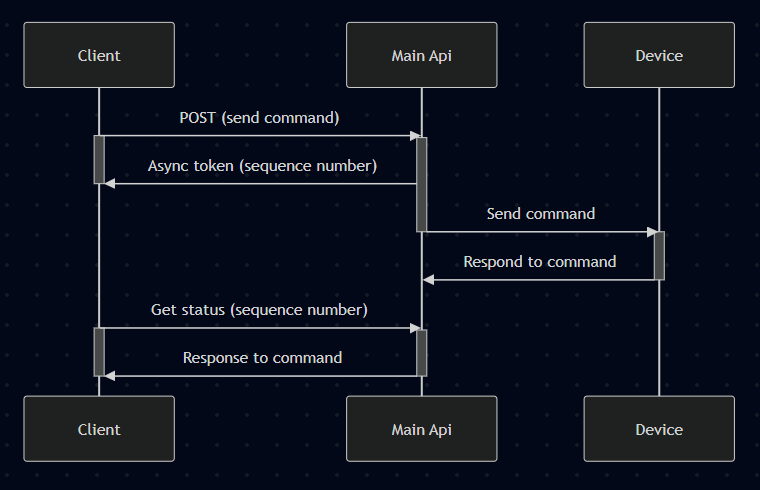
The Main API itself is responsible for sending commands to devices and retrieving their responses. Most API are asynchronous (as the device may be offline when the API is called) while others return cached responses from the device.
Authentication: All endpoints require authentication headers (see Deployment Package for token setup).
Quick Start: Common API requests
- List Devices →
GET {Main}/devices - Get details of a device →
GET {Main}/devices/{deviceId} - Send a command to the device →
POST {Main}/devices/{deviceId}/command - Get the status of a command →
GET {Main}/devices/{deviceId}/command/{sequence} - Get command history →
GET {Main}/devices/{deviceId}/commands - Get event history →
GET {Main}/events - Get details of an event →
GET {Main}/events/{eventId}
Full details of all API are available in the swagger
- Main API: https://base-url/qrms/swagger/index.html
Endpoints
1. List Devices
Gets a paginated list of devices, allowing filtering or sorting
Request:
GET /qrms/devices?pageNum=0&pageSize=2Response (200):
{
  "page": 0,
  "pageSize": 10,
  "total": 115,
  "results": [
    {
      "id": "e2357a72-23d7-4b01-8b69-3672142efcb6",
      "name": "U+bEcxbuC2rkA91W5qorDlwRpm5Qeg3zTVCznPU/jYc=",
      "serialNumber": "40913930D188932016B25F6780BC83048BE34D75E18F9B93D50D46351427DD10",
      "qwesId": "40913930d188932016b25f6780bc83048be34d75e18f9b93d50d46351427dd10",
      "chipId": null,
      "chipSerialNumber": null,
      "macAddress": null,
      "tags": [],
      "location": null,
      "model": {
        "id": 117,
        "mcn": "testQdragonX",
        "mcnRevision": "TBD",
        "manufacturer": "Qualcomm",
        "chipset": null,
        "chipsetRevision": null,
        "formFactor": "string",
        "productType": null
      },
      "deviceType": "TypeA",
      "productType": {
        "name": "TypeA",
        "deviceType": "TypeA",
        "uuid": "93ffdaa5-7db5-42c8-8c6b-d295299af1e4",
        "isCustomProductType": false,
        "createdOn": null
      },
      "configurations": [
        {
          "name": "isNativeMCN",
          "value": "true",
          "category": "MCN"
        }
      ],
      "userData": null,
      "manufacturedDate": "2026-01-06",
      "inventoryState": "ONBOARDED",
      "serviceState": "READY",
      "lastHeartbeatTime": null,
      "deviceIdentifiers": [
        {
          "id": 147,
          "value": "40913930d188932016b25f6780bc83048be34d75e18f9b93d50d46351427dd10",
          "deviceIdentifierType": {
            "id": 10,
            "name": "assetTag"
          }
        },
        {
          "id": 148,
          "value": "O/ZSMuRTtTQQ6vQBo35CHTpRxilVVhuDZrY1u12tjJyD+oIK6O1gUkWJ22KMJrlNAw5AYSKEacJtDe9IkakcyqHnMxDouesPO8HLZ1oZ6Agla/evqp8hBImpFFtNDm53",
          "deviceIdentifierType": {
            "id": 12,
            "name": "publicKey"
          }
        },
        {
          "id": 149,
          "value": "U+bEcxbuC2rkA91W5qorDlwRpm5Qeg3zTVCznPU/jYc=",
          "deviceIdentifierType": {
            "id": 14,
            "name": "keyId"
          }
        }
      ],
      "isInternal": false,
      "metricsInfo": {
        "metrics": null,
        "serviceState": null,
        "heartbeatTime": null
      },
      "isVirtual": false,
      "storageType": "NOT_SET",
      "lpn": null,
      "externalIdentifier": "40913930d188932016b25f6780bc83048be34d75e18f9b93d50d46351427dd10",
      "group": null,
      "lastGroup": null,
      "isSecureBoot": true,
      "configUpdateState": "NOT_SET",
      "moduleSn": null
    },
    {
      "id": "cf08b356-896c-45c0-9b5e-9b43f6a23612",
      "name": "testRemoval",
      "serialNumber": "WIX11038467",
      "qwesId": "testRemoval",
      "chipId": null,
      "chipSerialNumber": null,
      "macAddress": null,
      "tags": [],
      "location": null,
      "model": {
        "id": 117,
        "mcn": "testQdragonX",
        "mcnRevision": "TBD",
        "manufacturer": "Qualcomm",
        "chipset": null,
        "chipsetRevision": null,
        "formFactor": "string",
        "productType": null
      },
      "deviceType": "TypeA",
      "productType": {
        "name": "TypeA",
        "deviceType": "TypeA",
        "uuid": "93ffdaa5-7db5-42c8-8c6b-d295299af1e4",
        "isCustomProductType": false,
        "createdOn": null
      },
      "configurations": [
        {
          "name": "isUnsignedDevice",
          "value": "false",
          "category": "device"
        },
        {
          "name": "isNativeMCN",
          "value": "true",
          "category": "MCN"
        }
      ],
      "userData": null,
      "manufacturedDate": "2026-03-09",
      "inventoryState": "ONBOARDED",
      "serviceState": "READY",
      "lastHeartbeatTime": null,
      "deviceIdentifiers": [
        {
          "id": 2293,
          "value": "38yldTunpj+2aMAM0srmFsLnZu2kZNwEqtk9BzE+2tg=",
          "deviceIdentifierType": {
            "id": 14,
            "name": "keyId"
          }
        },
        {
          "id": 2292,
          "value": "PwRKAIEeQxwP7gxLLwPeoQIUTrDANoi6kFLlwAKb5ruFEr0qi+64gPZb8eCBpYJzc52KoUkSLvQ8Arl5pU2Xe/pNQxvtKnma6S4ljCjeZtje8nyDkMEZHoc+kS6H2lbX",
          "deviceIdentifierType": {
            "id": 12,
            "name": "publicKey"
          }
        },
        {
          "id": 2294,
          "value": "MIG2AgEAMBAGByqGSM49AgEGBSuBBAAiBIGeMIGbAgEBBDBUvTf5xXQz2ZloQeEF2zlkZo+tUBF434CyQqQ30FKND8hOs4Ja7J43g3gmBPmntKShZANiAAQ/BEoAgR5DHA/uDEsvA96hAhROsMA2iLqQUuXAApvmu4USvSqL7riA9lvx4IGlgnNznYqhSRIu9DwCuXmlTZd7+k1DG+0qeZrpLiWMKN5m2N7yfIOQwRkehz6RLofaVtc=",
          "deviceIdentifierType": {
            "id": 16,
            "name": "privateKey"
          }
        },
        {
          "id": 2291,
          "value": "TESTREMOVAL",
          "deviceIdentifierType": {
            "id": 10,
            "name": "assetTag"
          }
        }
      ],
      "isInternal": false,
      "metricsInfo": {
        "metrics": null,
        "serviceState": null,
        "heartbeatTime": null
      },
      "isVirtual": false,
      "storageType": "NOT_SET",
      "lpn": null,
      "externalIdentifier": "testRemoval",
      "group": null,
      "lastGroup": null,
      "isSecureBoot": true,
      "configUpdateState": "NOT_SET",
      "moduleSn": null
    }
  ]
}
2. Get details of a device
Get the details of a specific device
Request:
GET /qrms/devices/e2357a72-23d7-4b01-8b69-3672142efcb6?expand=deviceMetricsInfo%2CdeviceConfigurationsInfoResponse (200):
{
  "id": "e2357a72-23d7-4b01-8b69-3672142efcb6",
  "name": "U+bEcxbuC2rkA91W5qorDlwRpm5Qeg3zTVCznPU/jYc=",
  "serialNumber": "40913930D188932016B25F6780BC83048BE34D75E18F9B93D50D46351427DD10",
  "qwesId": "40913930d188932016b25f6780bc83048be34d75e18f9b93d50d46351427dd10",
  "chipId": null,
  "chipSerialNumber": null,
  "macAddress": null,
  "tags": [],
  "location": null,
  "model": {
    "id": 117,
    "mcn": "testQdragonX",
    "mcnRevision": "TBD",
    "manufacturer": "Qualcomm",
    "chipset": null,
    "chipsetRevision": null,
    "formFactor": "string",
    "productType": null
  },
  "deviceType": "TypeA",
  "productType": {
    "name": "TypeA",
    "deviceType": "TypeA",
    "uuid": "93ffdaa5-7db5-42c8-8c6b-d295299af1e4",
    "isCustomProductType": false,
    "createdOn": null
  },
  "configurations": [
    {
      "name": "isNativeMCN",
      "value": "true",
      "category": "MCN"
    }
  ],
  "userData": {
    "createdBy": "qrmscli",
    "createdOn": "2026-01-06T23:24:25.374323Z",
    "lastModifiedBy": "qrmscli",
    "lastModifiedOn": "2026-01-06T23:24:25.425251Z"
  },
  "manufacturedDate": "2026-01-06",
  "inventoryState": "ONBOARDED",
  "serviceState": "READY",
  "lastHeartbeatTime": null,
  "deviceIdentifiers": [
    {
      "id": 148,
      "value": "O/ZSMuRTtTQQ6vQBo35CHTpRxilVVhuDZrY1u12tjJyD+oIK6O1gUkWJ22KMJrlNAw5AYSKEacJtDe9IkakcyqHnMxDouesPO8HLZ1oZ6Agla/evqp8hBImpFFtNDm53",
      "deviceIdentifierType": {
        "id": 12,
        "name": "publicKey"
      }
    },
    {
      "id": 147,
      "value": "40913930d188932016b25f6780bc83048be34d75e18f9b93d50d46351427dd10",
      "deviceIdentifierType": {
        "id": 10,
        "name": "assetTag"
      }
    },
    {
      "id": 149,
      "value": "U+bEcxbuC2rkA91W5qorDlwRpm5Qeg3zTVCznPU/jYc=",
      "deviceIdentifierType": {
        "id": 14,
        "name": "keyId"
      }
    }
  ],
  "isInternal": false,
  "metricsInfo": {
    "metrics": null,
    "serviceState": null,
    "heartbeatTime": null
  },
  "isVirtual": false,
  "storageType": "NOT_SET",
  "lpn": null,
  "externalIdentifier": "40913930d188932016b25f6780bc83048be34d75e18f9b93d50d46351427dd10",
  "group": null,
  "lastGroup": null,
  "isSecureBoot": true,
  "configUpdateState": "NOT_SET",
  "moduleSn": null
}
3. Send a command to the device
Send a command to the device. This request receives sequenceNumber as a response, which can be used to get the status of the command
Request:
POST /qrms/devices/Device_G/command/systemInfoResponse (200):
{
  "deviceId": "Device_G",
  "sequenceNumber": 8006,
  "requestType": "SYSTEM_INFO",
  "requestStatus": "PENDING",
  "message": "Command to perform SYSTEM_INFO initiated.",
  "createdAt": "2025-11-26T01:05:44.2493195+00:00"
}
4. Get the status of a command
Get the status of a command. If the command is COMPLETE, the response will also contain the resultBody.
Request:
GET /qrms/devices/Device_G/command/8006Response (200):
{
  "deviceId": "Device_G",
  "sequenceNumber": 8006,
  "requestStatus": "COMPLETE",
  "completedAt": "2025-11-26T01:05:45.481521+00:00",
  "createdAt": "2025-11-26T01:05:44.249319+00:00",
  "requestType": "SYSTEM_INFO",
  "requestBody": null,
  "resultBody": {
    "Oem": {
      "Qualcomm": {
        "Locked": false,
        "@odata.type": "#Qualcomm.ComputerSystem"
      }
    },
    "SKU": "AA",
    "Model": "X2000094",
    "Status": {
      "State": "Enabled",
      "Health": "OK"
    },
    "Actions": {
      "Oem": {
        "#Qualcomm_ComputerSystem.Lock": {
          "target": "/redfish/Systems/0/Actions/Oem/Qualcomm_ComputerSystem.Lock"
        },
        "#Qualcomm_ComputerSystem.Locate": {
          "target": "/redfish/Systems/0/Actions/Oem/Qualcomm_ComputerSystem.Locate"
        }
      },
      "#ComputerSystem.Reset": {
        "target": "/redfish/Systems/0/Actions/ComputeSystem.Reset"
      }
    },
    "AssetTag": "DEVICE_G",
    "HostName": "Device_G",
    "PartNumber": "89324",
    "PowerState": "On",
    "Manufacturer": "Qualcomm",
    "SerialNumber": "2302-1324-ab25",
    "MemorySummary": {
      "TotalSystemMemoryGiB": 32
    },
    "ProcessorSummary": {
      "Count": 8,
      "Model": "Pegasus"
    }
  }
}
5. Get command history
Get a recent history of all commands run on the device. This can be helpful if sequence number is lost, or to get the most recent result for a given command request type.
By default, Snapdragon Guardian will only retain the most recent 100 commands. This can be configured by updating the MAX_COMMANDS_PER_DEVICE in the infrastructure package.
Request:
GET /qrms/devices/Device_G/commands?sort=sequenceNumber%2Cdesc&page=0&pageSize=2Response (200):
{
  "page": 0,
  "pageSize": 2,
  "total": 71,
  "results": [
    {
      "sequenceNumber": 8006,
      "deviceId": "Device_G",
      "requestStatus": "COMPLETE",
      "requestType": "SYSTEM_INFO",
      "statusCode": 0,
      "createdAt": "2025-11-26T01:05:44.249319+00:00",
      "acceptedAt": null,
      "completedAt": "2025-11-26T01:05:45.481521+00:00",
      "commandType": "REDFISH"
    },
    {
      "sequenceNumber": 8004,
      "deviceId": "Device_G",
      "requestStatus": "COMPLETE",
      "requestType": "GET_BIOS_SETTINGS",
      "statusCode": 0,
      "createdAt": "2025-11-26T01:03:57.84191+00:00",
      "acceptedAt": null,
      "completedAt": "2025-11-26T01:04:00.011442+00:00",
      "commandType": "REDFISH"
    }
  ]
}
6. Get event history
The device may generate events to notify the user on certain conditions. These are stored in a history log, and additional details can be retrieved for desired events.
Request:
GET /qrms/events?pageSize=2&page=0&deviceId=Device_G&sort=receivedAt,descResponse (200):
{
  "page": 0,
  "pageSize": 2,
  "total": 26,
  "results": [
    {
      "id": 274,
      "eventId": 1,
      "deviceId": "Device_G",
      "messageId": "SensorEvent.1.0.ReadingAboveUpperCriticalThreshold",
      "name": "ReadingAboveUpperCriticalThreshold",
      "description": null,
      "registryPrefix": "SensorEvent",
      "registryVersion": "1.0",
      "severity": "Critical",
      "messages": null,
      "receivedAt": "2025-11-24T06:48:07.368245+00:00",
      "eventStatus": "SEEN"
    },
    {
      "id": 272,
      "eventId": 1,
      "deviceId": "Device_G",
      "messageId": "SensorEvent.1.0.ReadingAboveUpperCriticalThreshold",
      "name": "ReadingAboveUpperCriticalThreshold",
      "description": null,
      "registryPrefix": "SensorEvent",
      "registryVersion": "1.0",
      "severity": "Critical",
      "messages": null,
      "receivedAt": "2025-11-24T06:48:07.341182+00:00",
      "eventStatus": "SEEN"
    }
  ]
}
7. Get details of an event
Get additional details of a specific event
By default, Snapdragon Guardian will only retain the most recent 100 events. This can be configured by updating the MAX_EVENTS_PER_DEVICE in the infrastructure package.
Request:
GET /qrms/events/274Response (200):
{
  "id": 274,
  "eventId": 1,
  "deviceId": "Device_G",
  "messageId": "SensorEvent.1.0.ReadingAboveUpperCriticalThreshold",
  "name": "ReadingAboveUpperCriticalThreshold",
  "description": "",
  "registryPrefix": "SensorEvent",
  "registryVersion": "1.0",
  "severity": "Critical",
  "messages": "{\"EventId\":\"1\",\"EventTimestamp\":\"2025-11-24T06:47:48.0174128Z\",\"MessageId\":\"SensorEvent.1.0.ReadingAboveUpperCriticalThreshold\",\"MessageArgs\":[\"battery\",\"85\",\"degree C\",\"80\"],\"MessageSeverity\":\"Critical\",\"OriginOfCondition\":{\"@odata.id\":\"/redfish/Chassis/0/PowerSubsystem/Batteries/0\"}}",
  "receivedAt": "2025-11-24T06:48:07.368245+00:00",
  "eventStatus": "SEEN"
}
Error Handling
HTTP Status Codes
| Code | Meaning | Common Causes |
|---|---|---|
| 200 | Success | Request completed successfully |
| 201 | Created | Async request was successfully created |
| 400 | Bad Request | Missing or invalid request parameters |
| 401 | Unauthorized | Missing or invalid authentication token |
| 403 | Forbidden | Session belongs to different user |
| 404 | Not Found | Session or turn ID not found |
| 500 | Server Error | Internal server error |